
Widefield Effect
Sepia
Lo-fi tape machine
Tape Drift adds wow, flutter, dropouts and saturation to incoming audio. Eight profiles set the tape EQ and noise, and Run controls the stop and restart of the transport.
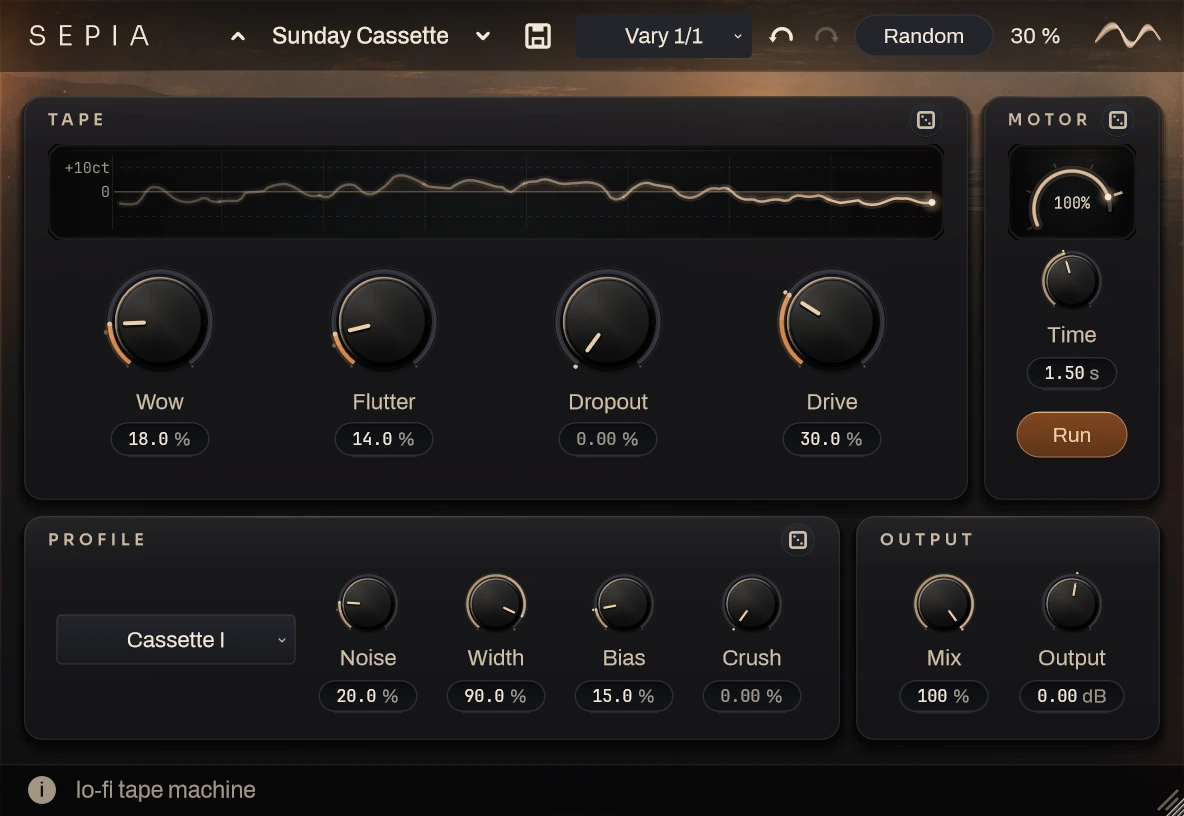
- Window
- 592 × 408
- Automatable
- 13
- Controls
- 13
- Presets
- 10
- MIDI in
- No
- Format
- VST3
In practice
Wow and flutter change the speed of the tape read head, which varies pitch. The hiss follows the transport speed and passes through the selected profile’s EQ.
Mix defaults to fully wet for insert use. Lower it to blend in the dry signal, which is delayed by the same 8 ms the plugin reports to the host.
Alt-drag Wow or Drive to give it a random range. At each Vary division chosen in the header, the knob picks a new value inside that range.
Reach for it whenAdd cassette flutter and hiss to a track, or automate a tape stop on a bus.
- 01
Eight tape profiles
Cassette I and II, 4-Track, VHS Hi-Fi, VHS Linear, Reel 15 ips, Microcassette and Boombox set different EQ and noise characteristics. Profile changes crossfade over 50 ms.
- 02
Transport control
Turn Run off to slow the tape and drop the pitch over 0.5 to 5 s. Turn it back on to restart. Run can be automated.
- 03
Dropouts
Random events briefly reduce level and high frequencies and shift the read position, with slight differences between channels.
- 04
Saturation and bit reduction
Drive adjusts an anti-aliased saturation stage with level compensation. Bias makes the saturation asymmetric. Crush reduces the sample rate and bit depth.
Signal path
- Tape buffer
- Wow and flutter
- Saturation
- Noise
- Profile EQ
- Dropouts
Controls
By section, in interface order.
Tape
- Wow
- Flutter
- Dropout
- Drive
Motor
- Time
- Run
Profile
- Profile
- Noise
- Width
- Bias
- Crush
Output
- Mix
- Output
Factory presets
10 included. Save your own from the preset menu.
- Init
- Sunday Cassette
- Chrome Glow
- Bedroom Four-Track
- Hi-Fi Haze
- Rewound VHS
- Studio Reel
- Pocket Memo
- Block Party 86
- Chewed Tape
Listen
- Sunday Cassette preset on a felt piano phrase
- Chewed Tape preset on a felt piano phrase
Pairs well with

Install
Download Sepia- 01
Extract
Download the ZIP file and extract it. It contains one .vst3 folder.
- 02
Copy
Copy Widefield Sepia.vst3 to C:\Program Files\Common Files\VST3. Windows may ask for administrator permission.
- 03
Rescan
Rescan plugins in your DAW and look for Widefield Sepia.