
Widefield Instrument
Compass
XY morph sampler
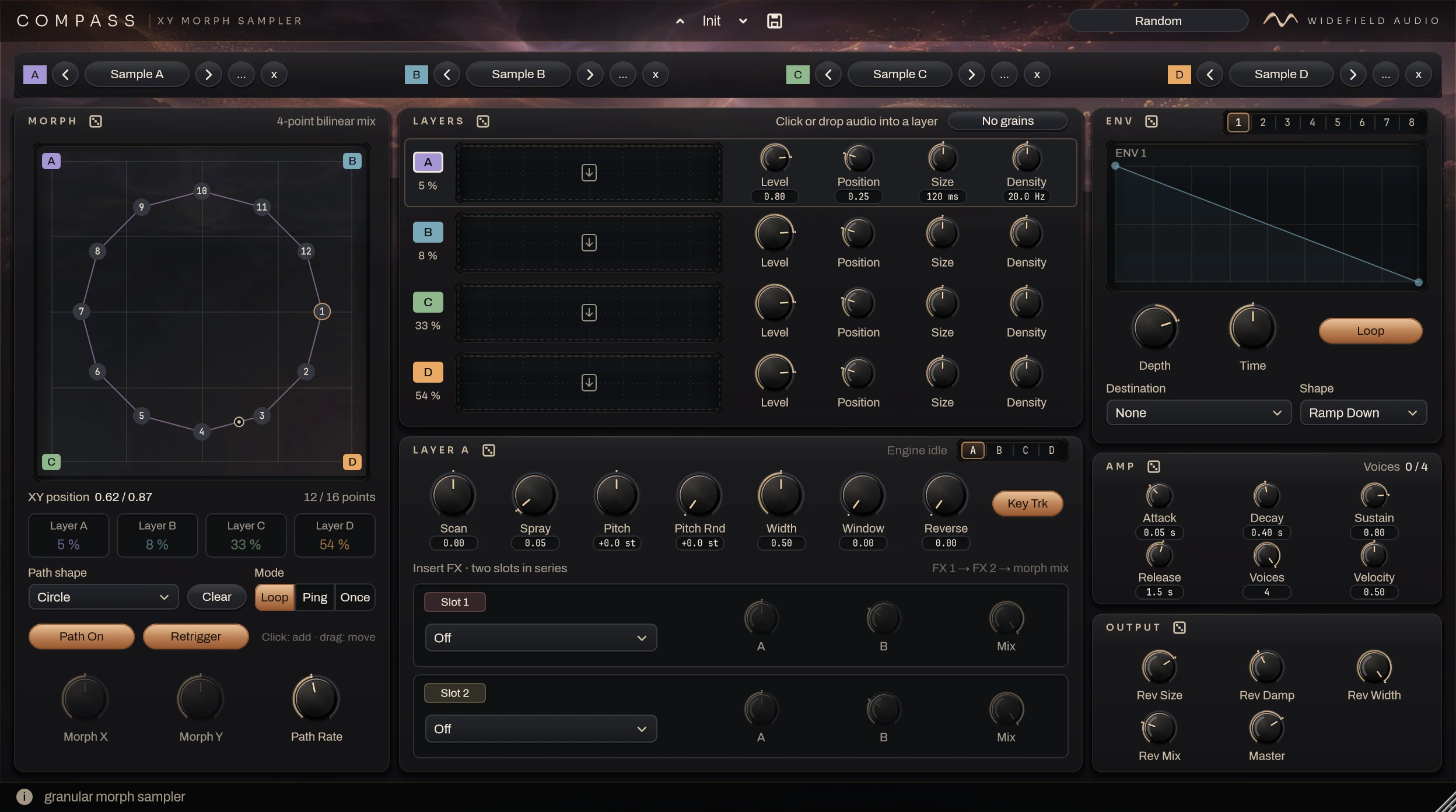
Each corner of the XY grid holds a granular layer. The morph point blends those layers along a path you draw. Eight breakpoint envelopes can modulate grain, effect and morph settings.
- Window
- 1248 × 696
- Automatable
- 129
- Controls
- 39
- Presets
- 10
- MIDI in
- Yes
- Format
- VST3
In practice
Drop a sample on each waveform row, then play a sustained note to hear the blend change along the current path. The path and envelopes keep running between notes and restart on the first note of a phrase.
The waveform rows display the grains playing in each layer. Click the grain counter for a larger view. Knobs under envelope control show the base value, current value and modulation range. Alt-drag a knob to give it a random range: each note picks its own layer and Amp values inside those ranges.
Factory presets keep your loaded samples. Try the same preset with different source material, or use the Random menu to vary layers, effects, paths or envelopes individually. The dice next to each panel title runs Random for one area only: morph path, layers, layer effects, envelopes, Amp or Output.
Reach for it whenDraw a repeatable transition between four samples within a single sustained note.
- 01
Four granular engines
Each layer reads its own file and runs up to 64 grains per voice. Grain size ranges from 5 ms to 2 s, with controls for position, density, pitch, spread and reverse probability.
- 02
XY path
Draw a path with up to 16 points or choose one of eight shapes. Run it in Loop, Ping-Pong or One Shot mode at 0.01 to 10 Hz.
- 03
Eight breakpoint envelopes
Each envelope has up to 16 points, a cycle of 0.05 to 30 s and a choice of 38 destinations.
- 04
Layer effects
Two slots per layer run in series. Options include filters, Drive, Fold, Crush, Ring Mod and a ping-pong delay of up to 2 s.
Signal path
- Four sample layers
- Grains
- Amp envelope
- Layer FX
- XY morph
- Reverb
Controls
By section, in interface order.
Morph
- Morph X
- Morph Y
- Mode
- Path Rate
- Path On
- Retrigger
- Path shape
Layers
- Level
- Position
- Size
- Density
Layer
- Scan
- Spray
- Pitch
- Pitch Rnd
- Width
- Window
- Reverse
- Key Trk
Insert FX
- Type
- A
- B
- Mix
Env
- Depth
- Time
- Loop
- Destination
- Shape
Amp
- Attack
- Decay
- Sustain
- Release
- Voices
- Velocity
Output
- Rev Size
- Rev Damp
- Rev Width
- Rev Mix
- Master
Factory presets
10 included. Save your own from the preset menu.
- Init
- Slow Mirror Drift
- Glass Scatter
- Reverse Choir
- Broken Machines
- Tidal Pad
- Stutter Morph
- Octave Rain
- Metal Breath
- Frozen Swell
Pairs well with


Install
Download Compass- 01
Extract
Download the ZIP file and extract it. It contains one .vst3 folder.
- 02
Copy
Copy Widefield Compass.vst3 to C:\Program Files\Common Files\VST3. Windows may ask for administrator permission.
- 03
Rescan
Rescan plugins in your DAW and look for Widefield Compass.