
Widefield Instrument
Phase
Multi-head sampler
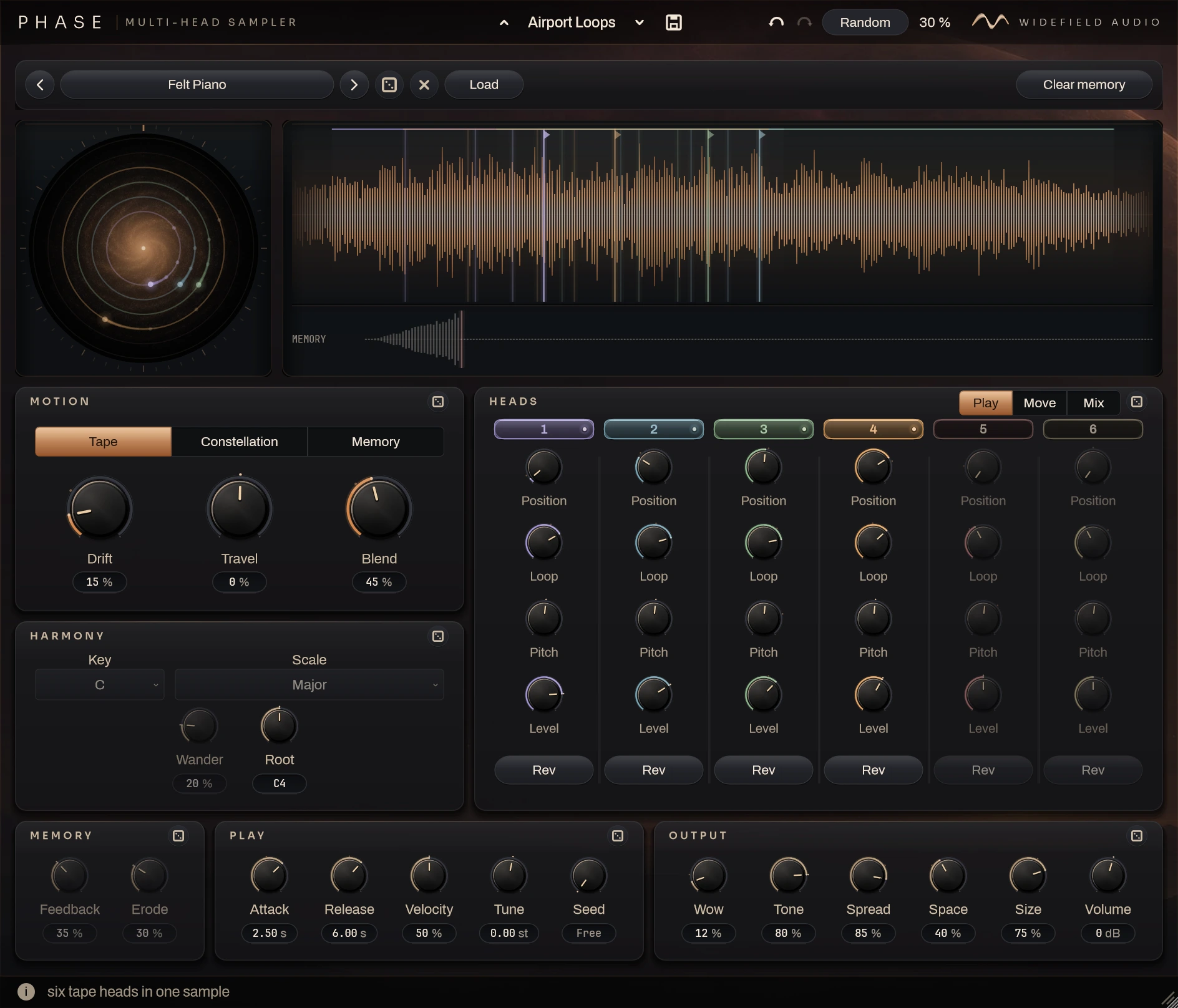
Up to six playback heads read one sample with independent loop points, pitches, directions and levels. Tape, Constellation and Memory modes change how the heads move or what they read.
- Window
- 944 × 808
- Automatable
- 93
- Controls
- 33
- Presets
- 13
- MIDI in
- Yes
- Format
- VST3
In practice
Set different loop lengths on three heads to hear the read positions move in and out of alignment. Drift varies their positions and speeds independently. Travel moves all loop positions through the sample together; each head’s own Travel and Speed on the Move page let one head scan faster, slower or backwards.
In Constellation, set the head pitches to a chord and raise Wander. At the end of each pass, a head can step to a neighbouring scale note.
Alt-drag a knob to give it a random range: each note picks its own head, motion and envelope values inside it, and with Seed above zero the same note always picks the same values.
In Memory mode, the lower lane shows the buffer being recorded. The main waveform shows the head positions and loop lengths.
Reach for it whenRun several loops of one sample and let their different lengths change how they overlap.
- 01
Playback heads
Each head has its own position, loop (0.05 to 20 s), pitch, level, reverse, tape speed (0.25x to 4x), travel, drift, blend, pan and tone, on the Play, Move and Mix pages.
- 02
Tape and Constellation
Tape varies speed and position with wow and flutter. Constellation quantises pitch to one of nine scales, and Wander moves the heads by scale steps.
- 03
Memory mode
Head 1 records onto a 16-second buffer. Heads 2 to 6 read it at their own delay, loop length and pitch. Feedback returns their output to the buffer and Erode fades older layers.
- 04
Sources and repeatability
Eight built-in sources include piano, choir and rain. Drop your own sample on the waveform, roll a random one with the dice or empty the slot. Seed repeats Drift and Wander.
Signal path
- Sample
- Six heads
- Memory tape
- Tone
- Space
- Volume
Controls
By section, in interface order.
Heads
- Badge 1–6
- Position
- Loop
- Pitch
- Level
- Rev
- Speed
- Travel
- Drift
- Blend
- Pan
- Tone
Motion
- Mode
- Drift
- Travel
- Blend
Harmony
- Key
- Scale
- Wander
- Root
Memory
- Feedback
- Erode
Play
- Attack
- Release
- Velocity
- Tune
- Seed
Output
- Wow
- Tone
- Spread
- Space
- Size
- Volume
Factory presets
13 included. Save your own from the preset menu.
- Init
- Airport Loops
- Worn Cassette
- Basin Drone
- Constellation
- Glass Orbit
- Living Memory
- Disintegration
- Rain Phasing
- Iron Cathedral
- Micro Memory
- Varispeed Choir
- Scanning Heads
Listen
- Airport Loops preset, C4 played four times (loops of 5.1 to 8.6 s)
- Constellation preset, single notes C3, A2, F2, G2
- Living Memory preset, single notes C4, G4, E4, C4
Pairs well with


Install
Download Phase- 01
Extract
Download the ZIP file and extract it. It contains one .vst3 folder.
- 02
Copy
Copy Widefield Phase.vst3 to C:\Program Files\Common Files\VST3. Windows may ask for administrator permission.
- 03
Rescan
Rescan plugins in your DAW and look for Widefield Phase.