
Widefield Effect
Prism
Slice shuffler
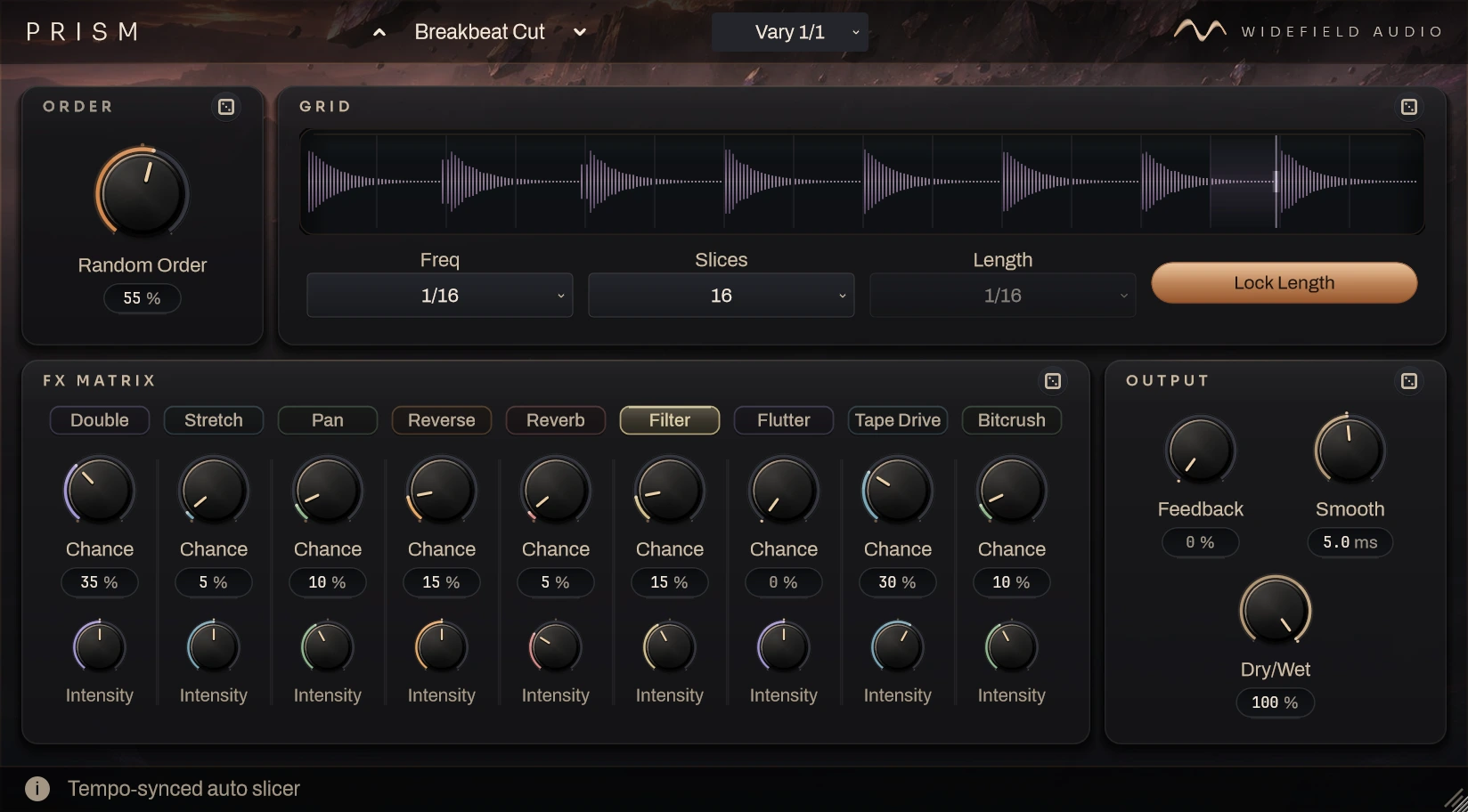
Glitch Shuffle records incoming audio in cycles of 2 to 16 slices. It plays each cycle in order or shuffles the slices, with independent effect probabilities for each slice.
- Window
- 824 × 456
- Automatable
- 26
- Controls
- 17
- Presets
- 9
- MIDI in
- No
- Format
- VST3
In practice
With Random Order at zero and the effects off, playback follows the original order one capture cycle behind. Raise Random Order to introduce repeats and skips while playback stays on the host grid.
For occasional ratchets, set Double to a low Chance. Adjust Dry/Wet to blend the rearranged slices with the incoming signal. The dice in the Grid title picks a new slice count and Random Order; the one in FX Matrix rolls new effect chances and intensities.
Alt-drag a Chance knob to give it a random range: at each Vary division in the header, from 1/64 to 8 bars in time with the host, it picks a new value inside that range.
Reach for it whenRearrange a drum loop in time with the track, with the occasional reverse or ratchet.
- 01
Capture and playback grid
The grid runs from 1/32 notes to whole notes, including triplets. Random Order sets the probability of choosing the next slice at random.
- 02
Per-slice effects
Double, Stretch, Pan, Reverse, Reverb, Filter, Flutter, Tape Drive and Bitcrush each have Chance and Intensity controls.
- 03
WAV export
Drag a slice from the slice strip to a DAW track to export a 24-bit stereo WAV at the session sample rate.
- 04
Feedback
Feedback returns the processed output to the capture buffer through a soft clipper.
Signal path
- Capture buffer
- Slice pool
- Slice voice
- Per-slice FX
- Reverb send
- Dry/Wet
Controls
By section, in interface order.
Order
- Random Order
Grid
- Freq
- Slices
- Length
- Lock Length
FX Matrix
- Double
- Stretch
- Pan
- Reverse
- Reverb
- Filter
- Flutter
- Tape Drive
- Bitcrush
Output
- Feedback
- Smooth
- Dry/Wet
Factory presets
9 included. Save your own from the preset menu.
- Init
- Everyday Chop
- Stutter
- Vocal Flip
- Guitar Shards
- Dusty Loop
- Breakbeat Cut
- Echo Trail
- Chaos
Listen
- Everyday Chop preset on a nylon guitar phrase at 100 BPM
- Guitar Shards preset on a nylon guitar phrase at 100 BPM
Pairs well with

Install
Download Prism- 01
Extract
Download the ZIP file and extract it. It contains one .vst3 folder.
- 02
Copy
Copy Widefield Prism.vst3 to C:\Program Files\Common Files\VST3. Windows may ask for administrator permission.
- 03
Rescan
Rescan plugins in your DAW and look for Widefield Prism.