
Widefield Instrument
Patter
Pluck rain
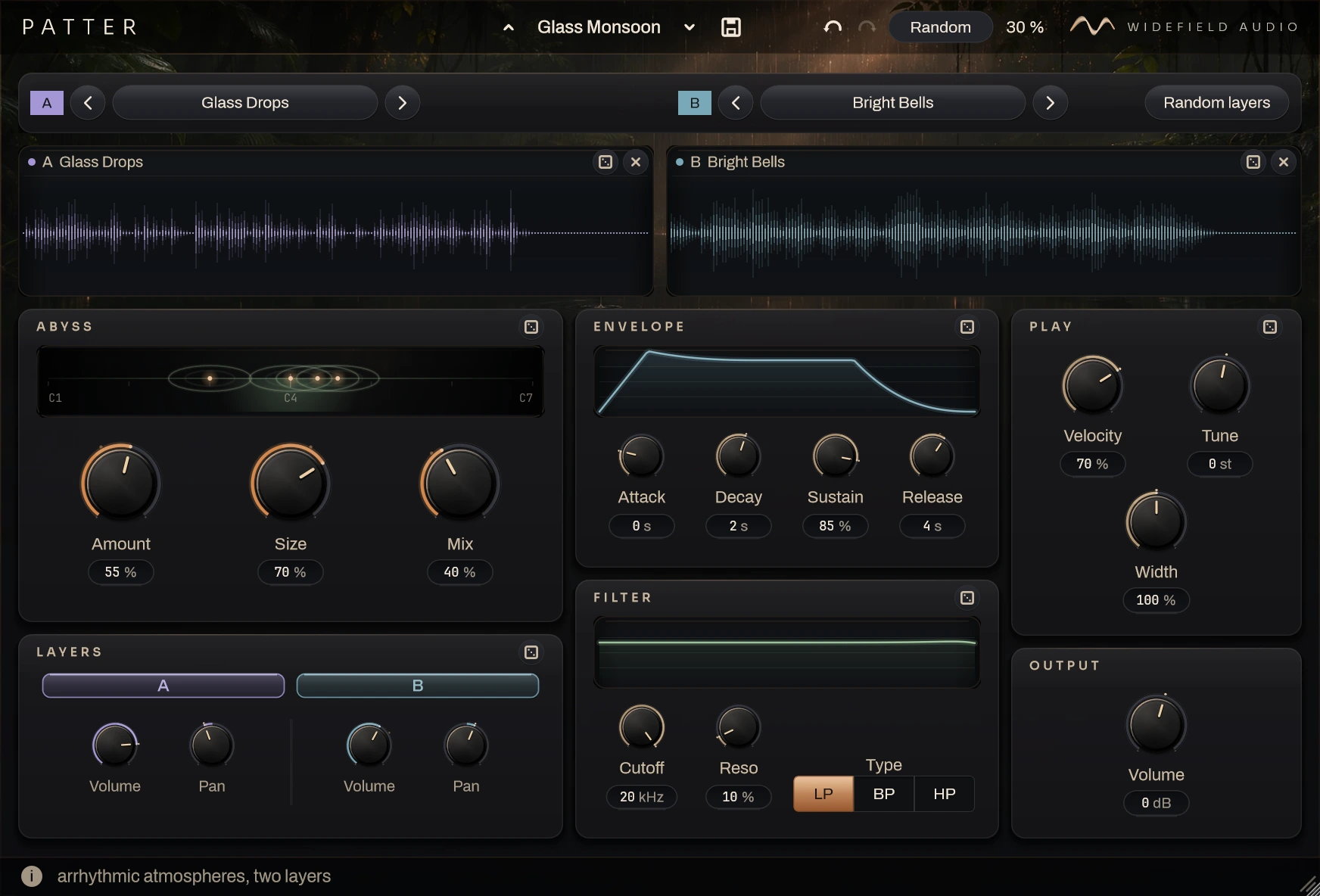
Each MIDI note triggers two streams of plucks pitched to the key you play. The layers feed a filter and Abyss, a reverb with reversed input and pitch-shifted feedback.
- Window
- 872 × 592
- Automatable
- 18
- Controls
- 16
- Presets
- 8
- MIDI in
- Yes
- Format
- VST3
In practice
The two layers have separate level and pan controls. Try Glass Drops with Kalimba Rain and pan the layers slightly apart to hear their patterns overlap.
Use a short attack to retain the pluck transients or lengthen attack and release for a softer entry and exit. Raise Abyss Amount and Size to make the descending reverb tail more audible.
Alt-drag a knob to give it a random range. Each note picks its own Tune, Velocity and envelope inside it; the other knobs change for the whole instrument at every note.
Reach for it whenHold a chord to play overlapping pluck patterns free of the project tempo.
- 01
Random start points
Each note begins at a random position in each source. Up to 16 voices transpose the sources by changing playback speed.
- 02
Eight built-in sources
Sources include kalimba, bells, wood taps, chimes and music box. Each runs for 20 seconds with irregularly spaced notes. You can also load your own files.
- 03
Abyss reverb
Reversed blocks of audio feed a reverb with 2 to 16 s of decay. The feedback shifts down an octave.
- 04
Source selection and presets
Each layer has a waveform box: drop a file on it, roll a new source with its dice or empty it with ✕. Eight factory presets pair built-in sources.
Signal path
- Layers A and B
- ADSR
- Filter
- Abyss
- Width
- Volume
Controls
By section, in interface order.
Abyss
- Amount
- Size
- Mix
Layers
- Volume
- Pan
Envelope
- Attack
- Decay
- Sustain
- Release
Filter
- Cutoff
- Reso
- Type
Play
- Velocity
- Tune
- Width
Output
- Volume
Factory presets
8 included. Save your own from the preset menu.
- Init
- Glass Monsoon
- Kalimba Drizzle
- Abyssal Chimes
- Wooden Eaves
- Night Shower
- Frozen Gutter
- Prism Storm
Listen
- Glass Monsoon preset, four two-note chords
- Kalimba Drizzle preset, four two-note chords
Pairs well with

Install
Download Patter- 01
Extract
Download the ZIP file and extract it. It contains one .vst3 folder.
- 02
Copy
Copy Widefield Patter.vst3 to C:\Program Files\Common Files\VST3. Windows may ask for administrator permission.
- 03
Rescan
Rescan plugins in your DAW and look for Widefield Patter.