
Widefield Instrument
Crate
Loop chopper
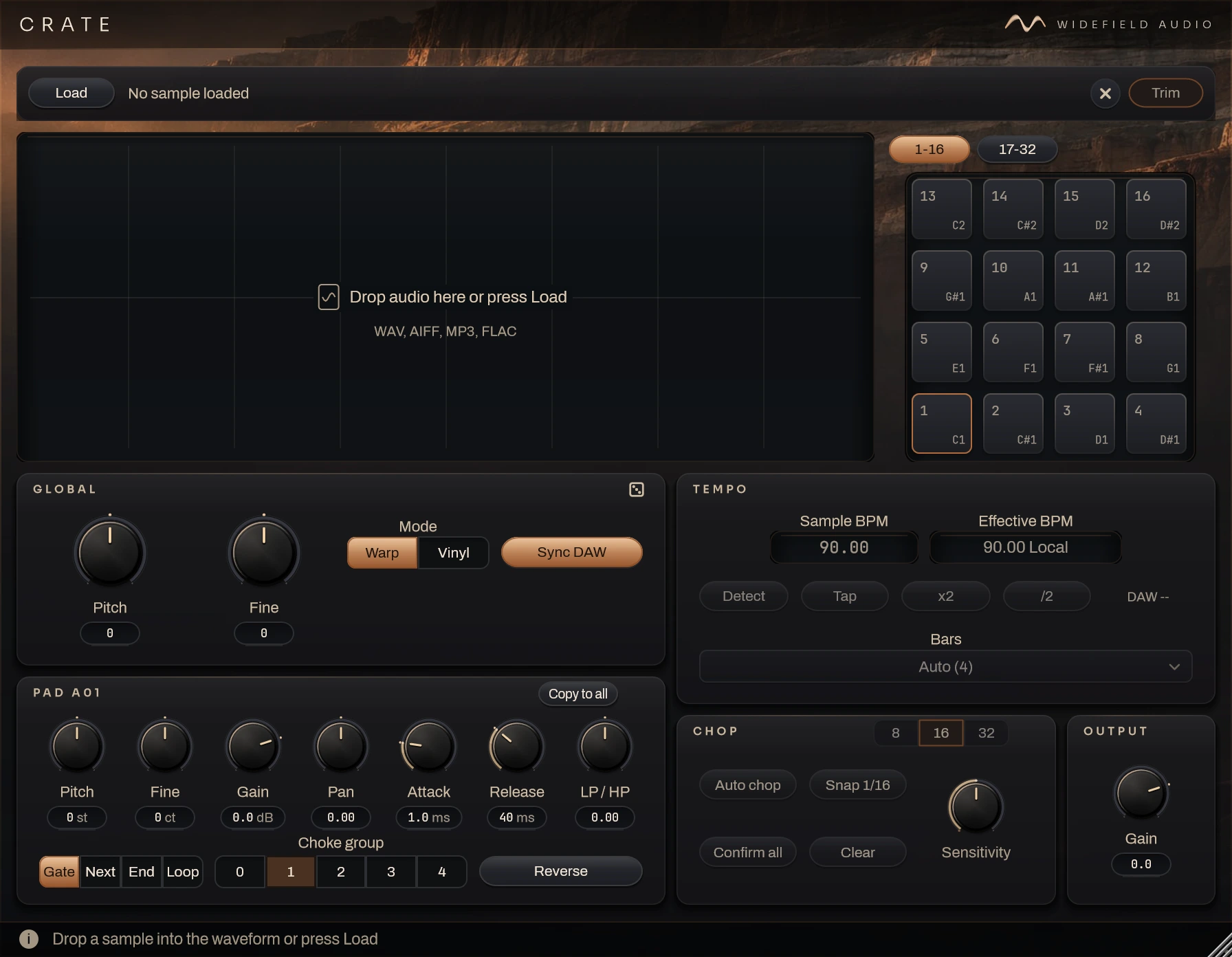
Slicer Swing detects tempo and downbeat, trims a loop to whole bars and suggests slice points. Confirmed slices map to up to 32 pads starting at C1.
- Window
- 896 × 696
- Automatable
- 5
- Controls
- 33
- Presets
- —
- MIDI in
- Yes
- Format
- VST3
In practice
After loading a loop, click a marker to audition it, double-click to confirm it or Alt-click to add one. For evenly spaced slices, choose a grid of 8, 16 or 32. Confirmed markers become playable pads.
Gate plays while the note is held. Next stops at the following marker, End continues to the end of the source loop, and Loop repeats the slice. Assign two pads to the same choke group to have one interrupt the other. Alt-drag the global Pitch or Fine knob to give each note its own tuning inside a random range. The ✕ in the source bar empties the session, clearing the markers and pad settings, and cannot be undone.
Reach for it whenPrepare a loop at the project tempo and decide where each pad starts and stops.
- 01
Tempo and bar detection
The detector searches from 70 to 180 BPM and trims to 1 to 32 whole bars. Set the tempo manually by typing it, tapping or using x2 and /2.
- 02
Slice detection and grid
Auto chop suggests markers at attacks and changes in pitch or harmony. Sensitivity adjusts the number of suggestions. Snap moves nearby markers towards the sixteenth-note grid.
- 03
Warp and Vinyl
Warp stretches the loop to the project tempo while preserving pitch. Vinyl changes pitch with playback speed.
- 04
Pad settings
Each pad has pitch, fine tuning, gain, pan, attack, release, low-pass or high-pass filtering, reverse, four play modes and four choke groups.
Signal path
- BPM detection
- Bar trim
- Warp or Vinyl
- Chop points
- Pad voice
- Master
Controls
By section, in interface order.
Source
- Load
- Campo file
- ✕
- Trim
Global
- Pitch
- Fine
- Mode
- Sync DAW
Tempo
- BPM
- Detect
- Tap
- x2
- /2
- DAW
- Bars
Pad
- Pitch
- Fine
- Gain
- Pan
- Attack
- Release
- LP / HP
- Play Mode
- Choke
- Reverse
- Copy to all
Chop
- Auto chop
- Snap 1/16
- Sensitivity
- Confirm all
- Clear
- Grid
Output
- Gain
Pairs well with

Install
Download Crate- 01
Extract
Download the ZIP file and extract it. It contains one .vst3 folder.
- 02
Copy
Copy Widefield Crate.vst3 to C:\Program Files\Common Files\VST3. Windows may ask for administrator permission.
- 03
Rescan
Rescan plugins in your DAW and look for Widefield Crate.