
Widefield Instrument
Platter
Performance slicer
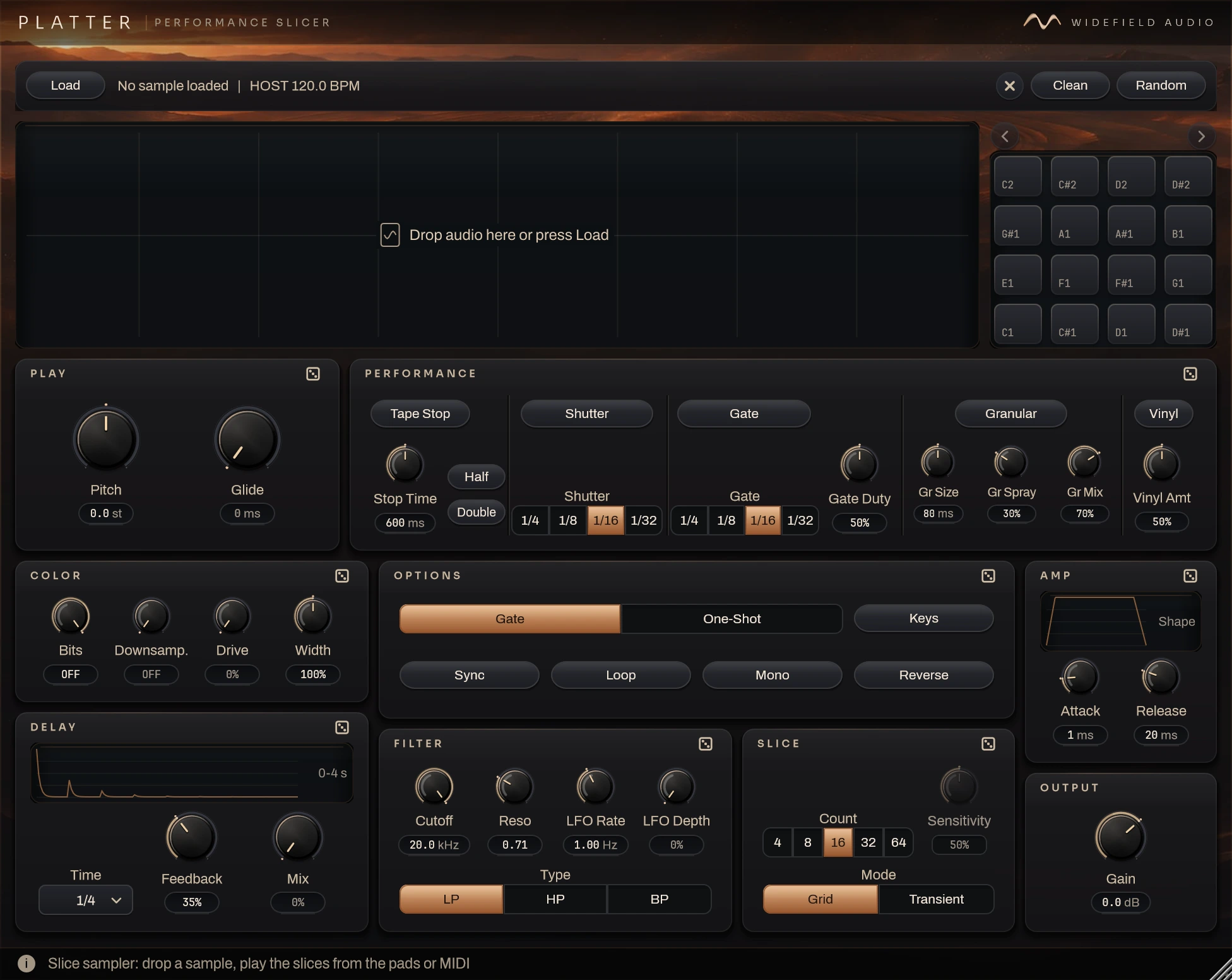
Slicer Spin cuts a sample into 4 to 64 slices on a grid or at detected transients. Play them from pads or MIDI and trigger seven performance effects from the bottom octave.
- Window
- 976 × 776
- Automatable
- 41
- Controls
- 40
- Presets
- —
- MIDI in
- Yes
- Format
- VST3
In practice
Drop a drum loop onto the interface to map slices from C1, with 16 pads per page. Sync changes playback speed to match the host tempo and shifts the pitch with it.
Alt-drag the Pitch knob to give it a random range, and each slice you play starts at its own pitch inside it.
Hold Shutter to repeat a section or use Tape Stop to slow playback over 50 ms to 3 s. Release the key to resume normal playback. CLEAN resets sound settings while keeping the slice assignments. The dice in a section’s title varies that section’s controls around their current values, and the ✕ in the source bar empties the sample.
Reach for it whenPlay slices with one hand and hold tape stops or repeats with the other.
- 01
Grid and transient slicing
Divide the sample evenly or adjust Sensitivity to detect attacks. Drag pads to swap slices or use Random to shuffle their assignments.
- 02
Performance effects
Tape Stop, Half, Double, Shutter, Gate, Granular and Vinyl can be triggered on screen or from C0 to F#0. Shutter, Gate and delay follow the host tempo.
- 03
Keys mode
Play the selected slice chromatically. Mono and Glide allow sliding between notes. Reverse, Loop and One-Shot set playback behaviour.
- 04
Filter, crusher and delay
Drive and stereo width feed a filter with a sine LFO, then sample-rate and bit-depth reduction and a tempo-synced delay.
Signal path
- Slices
- Voices
- Performance FX
- Filter and LFO
- Crusher
- Synced delay
Controls
By section, in interface order.
Play
- Pitch
- Glide
Performance
- Tape Stop
- Half
- Double
- Shutter
- Gate
- Granular
- Vinyl
- Stop Time
- Shut
- Gate Duty
- Gr Size
- Gr Spray
- Gr Mix
- Vinyl Amt
Color
- Bits
- Downsamp.
- Drive
- Width
Delay
- Time
- Feedback
- Mix
Options
- Gate / One-Shot
- Keys
- Sync
- Loop
- Mono
- Reverse
Filter
- Cutoff
- Reso
- LFO Rate
- LFO Depth
- Type
Slice
- Count
- Sensitivity
- Mode
Amp
- Attack
- Release
Output
- Gain
Pairs well with

Install
Download Platter- 01
Extract
Download the ZIP file and extract it. It contains one .vst3 folder.
- 02
Copy
Copy Widefield Platter.vst3 to C:\Program Files\Common Files\VST3. Windows may ask for administrator permission.
- 03
Rescan
Rescan plugins in your DAW and look for Widefield Platter.