
Widefield Effect
Cumulus
Shimmer cloud reverb
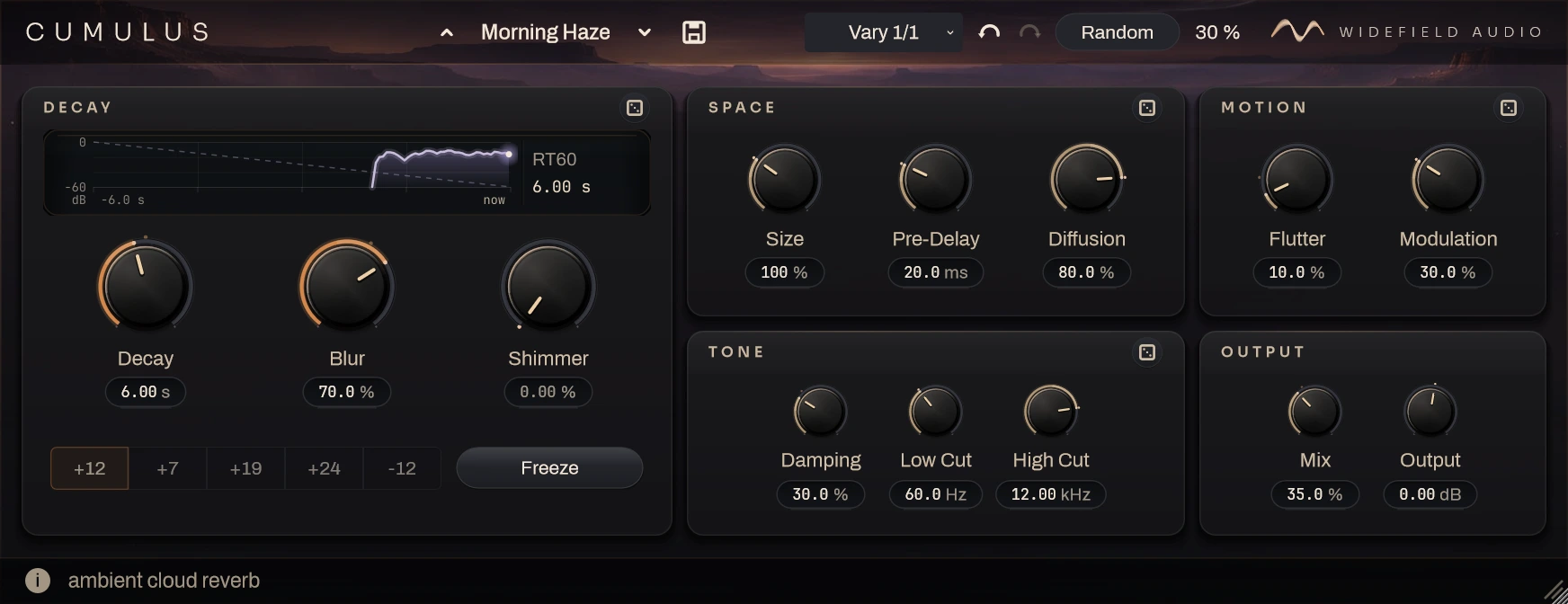
Reverb Rise feeds stereo echoes into an 8-line reverb. Blur controls how distinctly the echoes are heard. Decay ranges from 1 to 60 seconds, with pitched feedback and Freeze.
- Window
- 872 × 336
- Automatable
- 15
- Controls
- 15
- Presets
- 9
- MIDI in
- No
- Format
- VST3
In practice
At low Blur settings, the repeats are audible as separate echoes alternating between channels. Increasing Blur makes the tail denser. Size scales the delay lengths and pre-delay offsets the wet signal by up to 400 ms.
Try a short guitar or piano phrase to hear how Blur changes the attack of the reverb. Engage Freeze at the end of the phrase to sustain its tail while you keep playing.
Alt-drag Decay or Blur to give it a random range. At each Vary division chosen in the header, the reverb picks a new value inside that range.
Reach for it whenLet the reverb build after a note or chord, with enough decay to carry into the next phrase.
- 01
Stereo echo diffusion
Four echo taps per channel feed the reverb. Both stages share the same decay setting. Blur controls how much the repeats overlap.
- 02
Five shimmer intervals
Shimmer returns a pitch-shifted copy of the wet signal at +7, +12, +19, +24 or -12 semitones. A level-dependent limiter controls the feedback.
- 03
Freeze
Freeze closes the input, sets loop gains to unity and opens the damping filter. Flutter and Modulation continue.
- 04
Factory presets and Random
Nine presets include Broken Echoes and Endless Field. Random varies settings by the chosen amount and leaves Mix, Output and Freeze alone. A dice on each section title varies only that section.
Signal path
- Pre-delay
- Echo diffusion
- 8-line FDN
- Shimmer
- High and low cut
Controls
By section, in interface order.
Decay
- Decay
- Blur
- Shimmer
- Interval
- Freeze
Space
- Size
- Pre-Delay
- Diffusion
Tone
- Damping
- Low Cut
- High Cut
Motion
- Flutter
- Modulation
Output
- Mix
- Output
Factory presets
9 included. Save your own from the preset menu.
- Init
- Morning Haze
- Cumulus Wash
- Broken Echoes
- Warped Tape Sky
- Ascending Mist
- Fifth Horizon
- Deep Overcast
- Endless Field
Listen
- Morning Haze preset on a felt piano phrase
- Endless Field preset on a felt piano phrase
Pairs well with

Install
Download Cumulus- 01
Extract
Download the ZIP file and extract it. It contains one .vst3 folder.
- 02
Copy
Copy Widefield Cumulus.vst3 to C:\Program Files\Common Files\VST3. Windows may ask for administrator permission.
- 03
Rescan
Rescan plugins in your DAW and look for Widefield Cumulus.