
Widefield Effect
Flicker
Stutter sampler
Glitch Stutter jumps to random positions within a selected part of a sample or live recording buffer. Jumps can follow the host grid or be triggered by MIDI notes.
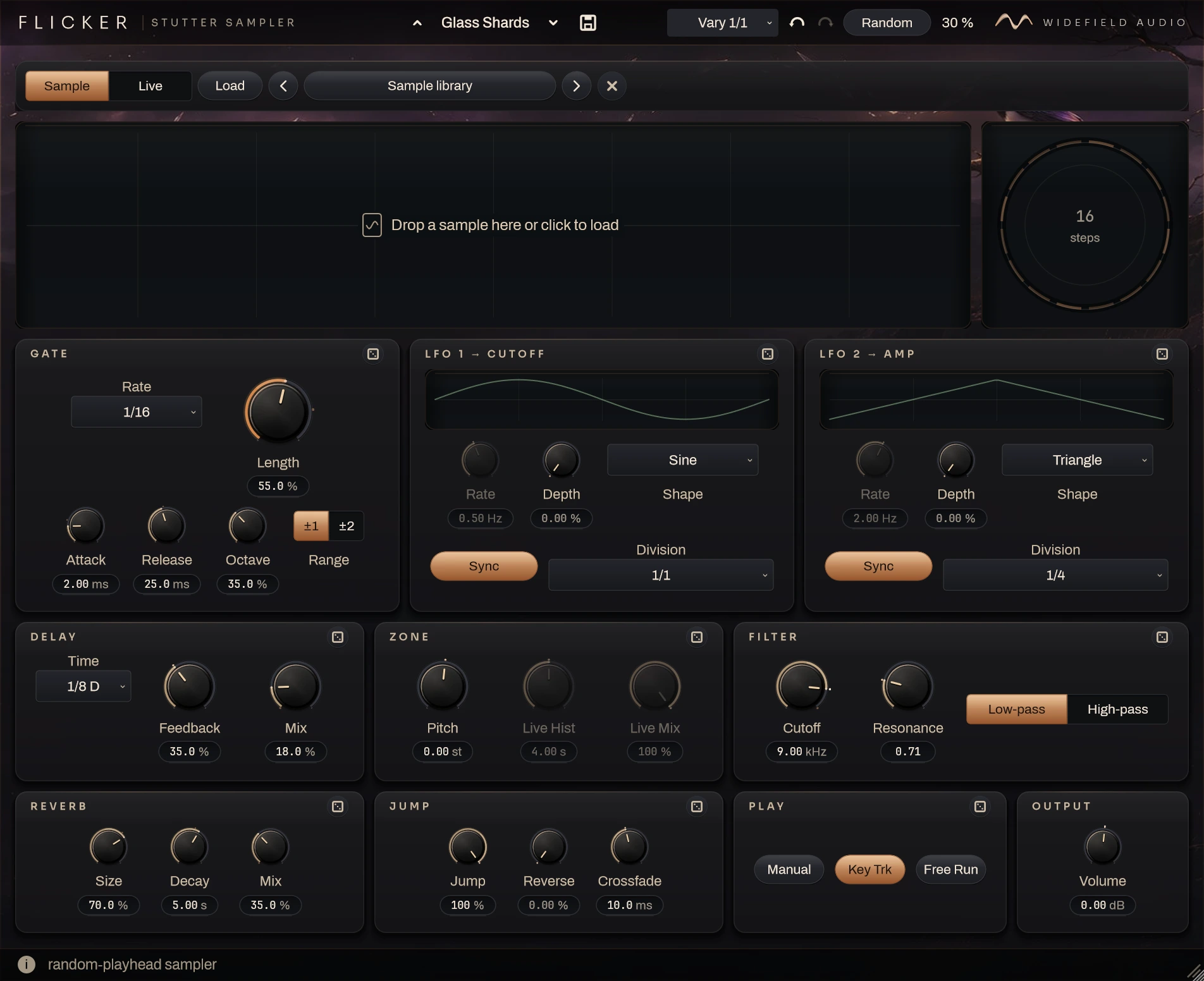
- Window
- 952 × 776
- Automatable
- 38
- Controls
- 38
- Presets
- 10
- MIDI in
- Yes
- Format
- VST3
In practice
In Sample mode, all voices jump to the same point in the selected region. Free Run plays the sample on the grid without MIDI input. The ✕ in the source bar removes the sample; undo brings it back.
In Live mode, try short gates at 1/16 for abrupt cuts. A slower attack and longer reverb soften the cuts. Use Live Mix to blend the result with the dry input.
Alt-drag Cutoff or Jump to give it a random range. At each Vary division chosen in the header, the knob picks a new value inside that range.
Reach for it whenRepeat fragments from a small region of a sample, with the option to trigger each jump from MIDI.
- 01
Sample and Live modes
Sample mode transposes a loaded file across eight MIDI voices. Live mode processes the last 0.5 to 20 s of input.
- 02
Playback region
Set the region with the waveform handles. Grid steps range from whole notes to 1/32 triplets, with separate probabilities for reverse playback and octave shifts.
- 03
Manual mode
Each MIDI note opens the gate and triggers a jump in place of the internal clock.
- 04
Filter and effects
A low-pass or high-pass filter has its own cutoff LFO. A second LFO modulates level, followed by a synced delay and an 8-line reverb.
Signal path
- Gate clock
- Jumping heads
- Filter
- Amp LFO
- Delay
- Reverb
Controls
By section, in interface order.
Source
- Source
Zone
- Start
- End
- Pitch
- Live Hist
- Live Mix
Gate
- Rate
- Length
- Attack
- Release
- Octave
- Range
LFO 1 → Cutoff
- Rate
- Depth
- Shape
- Sync
- Division
LFO 2 → Amp
- Rate
- Depth
- Shape
- Sync
- Division
Delay
- Time
- Feedback
- Mix
Reverb
- Size
- Decay
- Mix
Jump
- Jump
- Reverse
- Crossfade
Filter
- Cutoff
- Resonance
- Low-pass / High-pass
Play
- Manual
- Key Trk
- Free Run
Output
- Volume
Factory presets
10 included. Save your own from the preset menu.
- Init
- Glass Shards
- Tape Confetti
- Slow Kaleidoscope
- Puppet Strings
- Octave Rain
- Live Shuffle
- Live Stutter Gate
- Live Cathedral
- Live Keys
Listen
- Live Shuffle preset on a felt piano phrase
- Live Stutter Gate preset on a felt piano phrase
Pairs well with

Install
Download Flicker- 01
Extract
Download the ZIP file and extract it. It contains one .vst3 folder.
- 02
Copy
Copy Widefield Flicker.vst3 to C:\Program Files\Common Files\VST3. Windows may ask for administrator permission.
- 03
Rescan
Rescan plugins in your DAW and look for Widefield Flicker.